1. Installing Madgraph
- Homepage URL
https://launchpad.net/mg5amcnlo
- Download Method 01 (Direct Download)
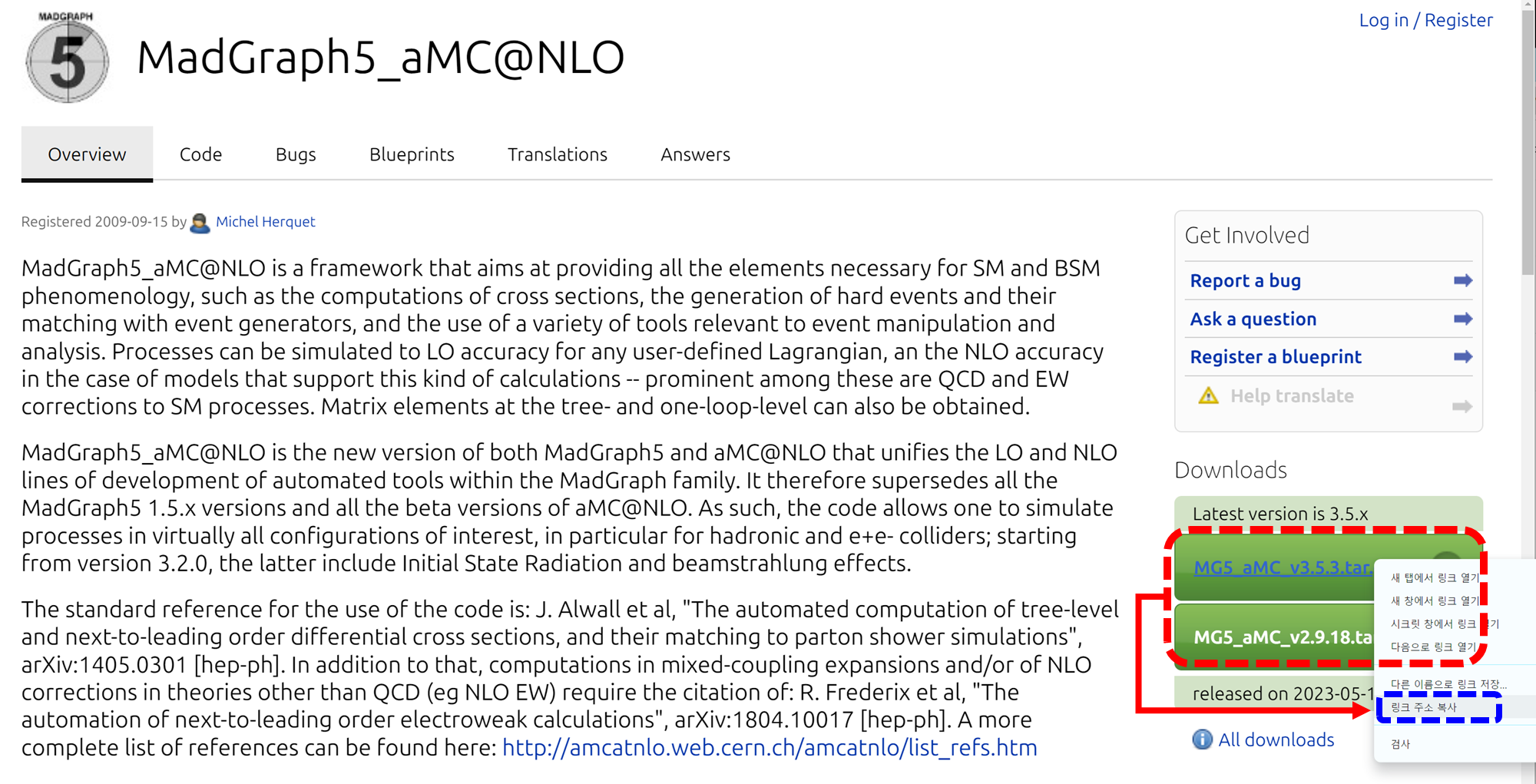
First, navigate to the MadGraph5 homepage and click on the link inside the Downloads box at the bottom to begin the download.
- Download Method 02 (Using [ wget ])
Alternatively, if you prefer to download using [ wget ] command on a Linux system, move your mouse pointer over the download link, right-click to open the context menu, and click "Copy link address." This copies the link address to your clipboard, which you can paste into the terminal to download. The [ wget ] command for the current version is structured as follows:
wget https://launchpad.net/mg5amcnlo/3.0/3.5.x/+download/MG5_aMC_v3.5.3.tar.gz
- Extracting the Madgraph compressed file
Extract the Madgraph compressed [ .tar ] file using the [ tar ] command with the [ -zxvf ] option.
tar -zxvf MG5_aMC_v3.5.3.tar.gz
- Running Madgraph
The executable file for the downloaded madgraph is located in the [ bin ] directory. Use the following command to run the executable file.
cd MG5_aMC_v3_5_3/bin
./mg5_aMC
2. Installing Additional Packages
************************************************************
*                                                          *
*                     W E L C O M E to                     *
*              M A D G R A P H 5 _ a M C @ N L O           *
*                                                          *
*                                                          *
*                 *                       *                *
*                   *        * *        *                  *
*                     * * * * 5 * * * *                    *
*                   *        * *        *                  *
*                 *                       *                *
*                                                          *
*         VERSION 3.5.3                 2023-12-23         *
*                                                          *
*    The MadGraph5_aMC@NLO Development Team - Find us at   *
*              http://madgraph.phys.ucl.ac.be/             *
*                            and                           *
*            http://amcatnlo.web.cern.ch/amcatnlo/         *
*                                                          *
*               Type 'help' for in-line help.              *
*           Type 'tutorial' to learn how MG5 works         *
*    Type 'tutorial aMCatNLO' to learn how aMC@NLO works   *
*    Type 'tutorial MadLoop' to learn how MadLoop works    *
*                                                          *
************************************************************
load MG5 configuration from ../input/mg5_configuration.txt
fastjet-config does not seem to correspond to a valid fastjet-config executable (v3+). We will use fjcore instead.
 Please set the 'fastjet'variable to the full (absolute) /PATH/TO/fastjet-config (including fastjet-config).
 MG5_aMC> set fastjet /PATH/TO/fastjet-config

eMELA-config does not seem to correspond to a valid eMELA-config executable.
 Please set the 'fastjet'variable to the full (absolute) /PATH/TO/eMELA-config (including eMELA-config).
 MG5_aMC> set eMELA /PATH/TO/eMELA-config

lhapdf-config does not seem to correspond to a valid lhapdf-config executable.
Please set the 'lhapdf' variable to the (absolute) /PATH/TO/lhapdf-config (including lhapdf-config).
Note that you can still compile and run aMC@NLO with the built-in PDFs
 MG5_aMC> set lhapdf /PATH/TO/lhapdf-config

None does not seem to correspond to a valid lhapdf-config executable.
Please set the 'lhapdf' variable to the (absolute) /PATH/TO/lhapdf-config (including lhapdf-config).
Note that you can still compile and run aMC@NLO with the built-in PDFs
 MG5_aMC> set lhapdf /PATH/TO/lhapdf-config

Using default text editor "vi". Set another one in ./input/mg5_configuration.txt
No valid eps viewer found. Please set in ./input/mg5_configuration.txt
No valid web browser found. Please set in ./input/mg5_configuration.txt
Checking if MG5 is up-to-date... (takes up to 2s)
failed to connect server
Loading default model: sm
INFO: load particles
INFO: load vertices
INFO: Restrict model sm with file ../models/sm/restrict_default.dat .
INFO: Run "set stdout_level DEBUG" before import for more information.
INFO: Change particles name to pass to MG5 convention
Defined multiparticle p = g u c d s u~ c~ d~ s~
Defined multiparticle j = g u c d s u~ c~ d~ s~
Defined multiparticle l+ = e+ mu+
Defined multiparticle l- = e- mu-
Defined multiparticle vl = ve vm vt
Defined multiparticle vl~ = ve~ vm~ vt~
Defined multiparticle all = g u c d s u~ c~ d~ s~ a ve vm vt e- mu- ve~ vm~ vt~ e+ mu+ t b t~ b~ z w+ h w- ta- ta+
If running Madgraph as described above results in a warning massage like [ fastjet-config does not seem to correspond to a valid fastjet-config executable ], installing additional packages and registering their paths in the configuration file is good.
While Madgraph is running, entering the following command will proceed with the installation. Compilation may take several minutes. Each line installs [ fastjet ], [ lhapdf6 ], and [ pythia8 ], respectively.
MG5_aMC>install fastjet
MG5_aMC>install lhapdf6
MG5_aMC>install pythia8
However, Madgraph may need to find the paths for [ lhapdf6 ] and [ fastjet ] properly in the current version. Therefore, while Madgraph is running, use the following commands to inform the Madgraph configuration file of the paths to [ lhapdf6 ] and [ fastjet ]:
MG5_aMC>set <Path-to-madgraph>/MG5_aMC_v3_5_3/HEPTools/lhapdf6_py3/bin/lhapdf-config
MG5_aMC>set <Path-to-madgraph>/MG5_aMC_v3_5_3/HEPTools/fastjet/bin/fastjet-config
Additionally, you can also add the above paths to the [ mg5_configuration.txt ] file located in the [ input ] directory of the Madgraph installation folder as follows:
lhapdf = <path-to-madgraph>/MG5_aMC_v3_5_3/HEPTools/lhapdf6_py3/bin/lhapdf-config
fastjet = <path-to-madgraph>/jhlee/MG5_aMC_v3_5_3/HEPTools/fastjet/bin/fastjet-config
- Manually Installing Packages and Adding Paths to the Madgraph Configuration
If you choose not to use the install command in the Madgraph prompt, you can manually install each package and directly set the necessary local file paths in [ input/mg5_configuration.txt ]. For example, after installing [ fastjet ], if the path to [ fastjet-config ] in the [ bin ] directory is as follows:
/User/software/fastjet-3.4.2/installation/bin/fastjet-config
Then you should add fastjet to the [ mg5_configuration.txt ] like this:
fastjet = /User/software/fastjet-3.4.2/installation/bin/fastjet-config
'CMS Experiment > CMS Computing method' 카테고리의 다른 글
| Madgraph5 설치 (6) | 2024.03.01 |
|---|---|
| CERN Certification (grid, crab, voms, CA certification etc) (0) | 2023.03.29 |