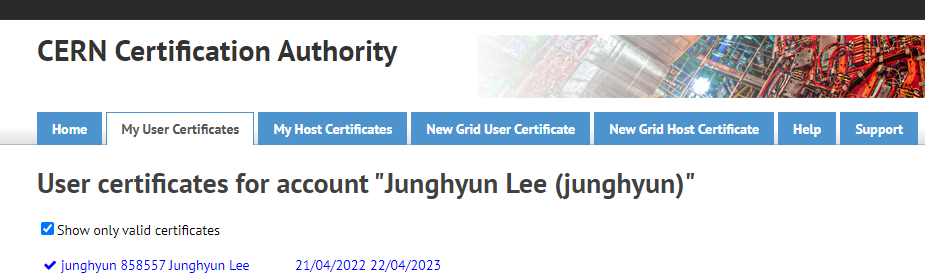
1. 기본 Certification Authority 웹사이트 안에서 우측쯤에 My User certificates가 있음

그걸 눌러서 들어가면 아래와 같음
2. 여기서 Host는 tier3 관리자 같은 사람들을 의미하므로 관심을 두지 말자.
개인은 New Grid User Certificate 같은데서 새로 발급같은거 받으면 된다.
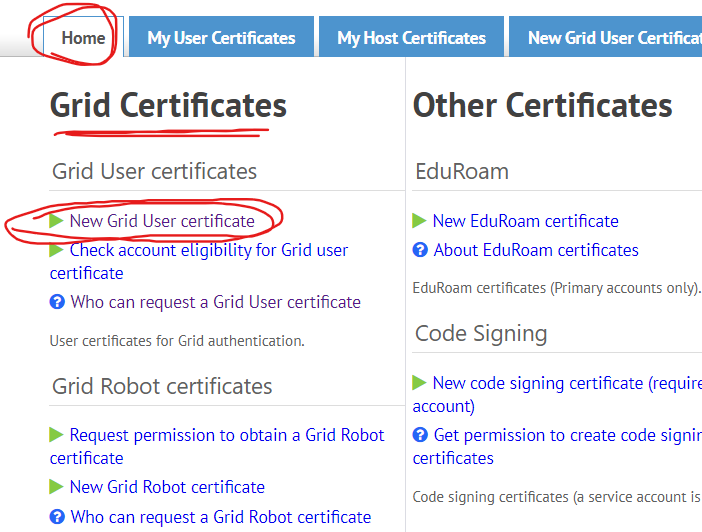
이건 CERN USER면 발급 후 자동으로 CA certificates를 알아서 mapping한다.
(이걸 Resource에서 확인하고 non-CERN certificates를 등록하는 방법이 내 블로그의 다른 포스트에 있음
https://research-note-particle-physics.tistory.com/208)

여기서 보면 새로 발급받은 두 번째 인증서가 보인다. user 번호가 같은 것으로 보아 mapping 된 것으로 보인다. 그런즉 voms에선 자동으로 인증서가 갱신되었다는 말이 된다. 이 포스트의 하단 부분에 voms에 직접 해당한다.
https://twiki.cern.ch/twiki/bin/view/CMSPublic/PersonalCertificate
PersonalCertificate < CMSPublic < TWiki
Personal certificates from CERN A personal certificate consists of a pair of files: the private key (userkey.pem); and the certificate itself, containing the public key (usercert.pem). To obtain a certificate, a request has to be made to a Certification Au
twiki.cern.ch
기본적으로 새로 발급받은 certificates는 다운로드 링크가 생긴다. (위 링크의 스크린샷에서 확인 가능)
내가 다운받은 파일은 myCertificate.p12 파일이 다운로드 되었다.
///////////////////////////////////////////////////////////////////////////////////////////////////////////////////////
주의 ) 만약 사이트 접속에 문제가 있다면 아래의 링크에서 먼저 (아마도 공용) windows용 certificates를 다운받고 신뢰할수 있는 루트 사용자로 등록해야 함.

https://cafiles.cern.ch/cafiles/certificates/list.aspx?ca=grid
CERN Certification Authorities Files and Documents
Trust the CERN Grid Certification Authority Trusting the CERN Grid Certification Authority is necessary to allow applications to recognize the certificates issued by the Certification Authority. To trust the CERN Grid Certification Authority, you need to i
cafiles.cern.ch
///////////////////////////////////////////////////////////////////////////////////////////////////////////////////////
4. 이렇게 발급받은 certificates가 [ .p12 ] 확장자라면 바로 웹에다 등록이 가능하다. 여러 다양한 웹 프로그램마다 인증서 등록 방법이 다르므로 잘 알아보라.
예를 들어 CERN은 firefox 브라우저에 대해 매우 자세히 인증서 등록 방법을 알려준다.
https://ca.cern.ch/ca/Help/?kbid=040110
CERN Certification Authority
Trust CERN Root Certificate with Mozilla On Mozilla, the CERN Root certificate is not trusted by default, so CERN Certificates will not be verified correctly and cannot be used to authenticate. Resolution The CERN Grid Certification Authority certificates
ca.cern.ch

Cern Certification authorities에서 help 메유의 firefox usage를 보면 된다.
한편 나는 크롬을 사용하므로 크롬에서 인증서를 등록하고자 한다.
https://passwd.tistory.com/entry/Chrome-%EC%9D%B8%EC%A6%9D%EC%84%9C-%EB%93%B1%EB%A1%9D
Chrome 인증서 등록
크롬 브라우저가 자체 서명한 인증서를 사용할 수 있도록 인증서 등록 방법에 대해 적어둔다. 방법 1. 크롬 설정에 접근 오른쪽 메뉴 > 설정 클릭 2. 크롬 보안 설정에 접근 개인정보 및 보안 > 보
passwd.tistory.com
크롬의 경우 설정에 들어간 후 개인 정보 및 보안 탭에 들어가고 그 안에서 기기 인증서 관리 목록에 들어간다
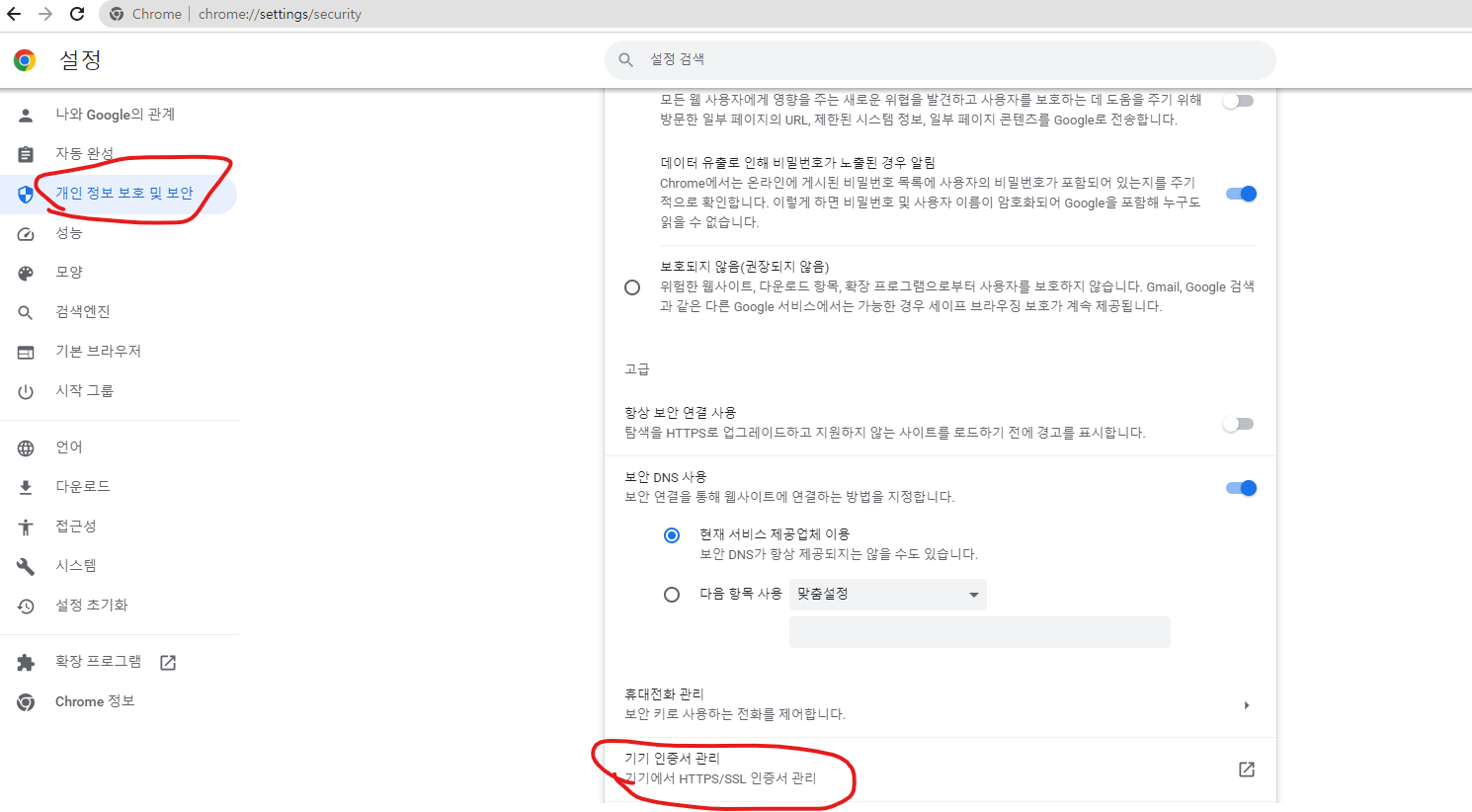
여기서 가져오기 기능을 통해 인증서를 가져 오면 되는데 중요한 점은 공용 인증서를 등록할 때 처럼 [ 신뢰할 수 있는 루트 사용자 ] 가 아닌 그냥 [ 개인 ] 에 인증서를 가져 오면 된다는 것이다.
이렇게 하면 DAS나 Voms 사이트에 접속 시 인증서 사용을 물어보며 비밀번호를 치면 접속할 수 있다.
5. 이제야 CA를 통해서 voms certificates를 발급받을 수 있게 된다.
이제 voms homepages의 voms admin에서 등록 절차를 시작하면 된다.
https://twiki.cern.ch/twiki/bin/view/CMSPublic/SWGuideLcgAccess
SWGuideLcgAccess < CMSPublic < TWiki
How to get access to WLCG Summary Three things are needed to have access to WLCG: an account on a User Interface (any machine with the WLCG commands installed). a personal certificate, used to authenticate with the Grid; having your personal certificate re
twiki.cern.ch
이게 좀 상세한 voms 등록 링크
https://twiki.cern.ch/twiki/bin/view/CMSPublic/SWGuideVomsFAQ#Browser_issues
SWGuideVomsFAQ < CMSPublic < TWiki
VOMS FAQs Purpose of this page is to help when you need to contact VOMS Admin server but have problems. If you look for a general introduction to how to get a certificate, a VOMS membership, use those with CMSWEB and/or CRAB etc., please look in the CMS Of
twiki.cern.ch
(아마도 certificates에서 나온 usercert.pem 을 업로드 하는 듯하다. public key가 아니다. 즉 CA와 voms 인증은 연결될 것이라 생각한다.)
6. 모두 제대로 수행되었다면 voms를 아래와 같이 실행 가능하다
voms-proxy-init --rfc --voms cms -valid 192:00
7. CA를 다운받을 때 애초에 [ .p12 ] 가 다운받아진다.
그러나 voms를 사용하려면 CA 외에도 usercert.pem 파일이 voms 홈페이지에 등록되어야 하며 또한 [ .globus ] 디렉토리에 usercer와 userkey가 존재해야 한다.
아래는 lxplus에서 그것을 수행하는 방법론이다.
[ 참고: 여기서 관련 문서에는 CA 파일 이름이 mycert.p12인데 내 경우엔 myCertificate.p12였다. 이 부분만 주의해서 생각하며 문서를 읽자 ]
- [ .p12 ] to [ .pem ]
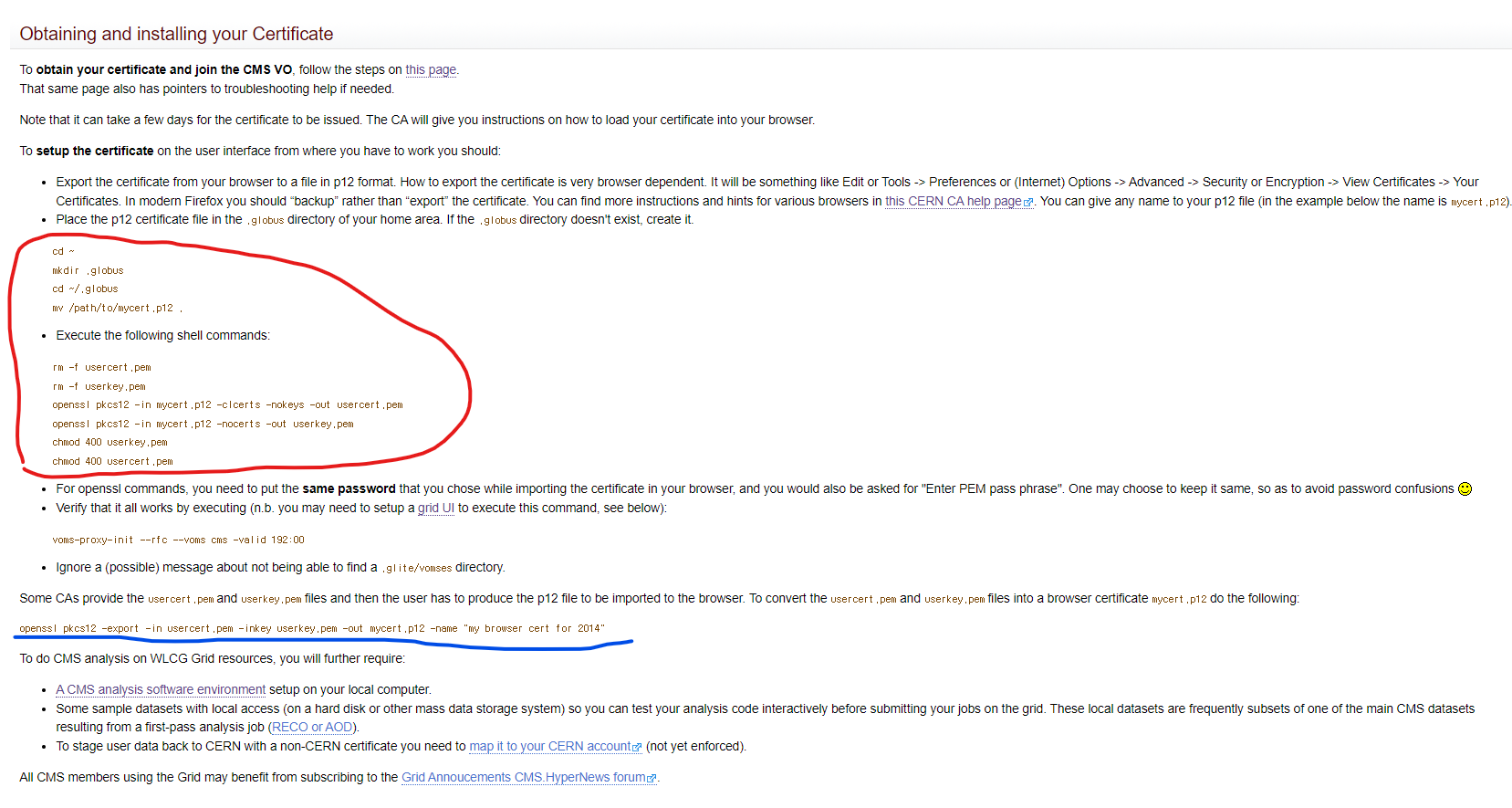
만약 기존 [ usercert.pem ] [ userkey.pem ] 이 존재한다면 삭제한다. 그리고 .p12로부터 .pem을 만든다. 즉 아래와 같이 하면 된다.
      cd ~
      mkdir .globus
      cd ~/.globus
      mv /path/to/mycert.p12 .
- Execute the following shell commands:
      rm -f usercert.pem
      rm -f userkey.pem
      openssl pkcs12 -in mycert.p12 -clcerts -nokeys -out usercert.pem
      openssl pkcs12 -in mycert.p12 -nocerts -out userkey.pem
      chmod 400 userkey.pem
      chmod 400 usercert.pem
- [ .pem ] to [ .p12 ]
openssl pkcs12 -export -in usercert.pem -inkey userkey.pem -out mycert.p12 -name "my browser cert for 2014"
관련 문서 링크 및 스크린샷
https://twiki.cern.ch/twiki/bin/view/CMSPublic/WorkBookStartingGrid#BasicGrid
WorkBookStartingGrid < CMSPublic < TWiki
5.1 Chapter Overview -- Getting Started Complete: Detailed Review status Goals of this page: This page is intended to provide you with an overview of this entire Chapter, pointing out which parts are required reading to get physics analysis done on the CMS
twiki.cern.ch
8. 한편 Cern certification authorities에서도 위의 방법론을 설명한다.
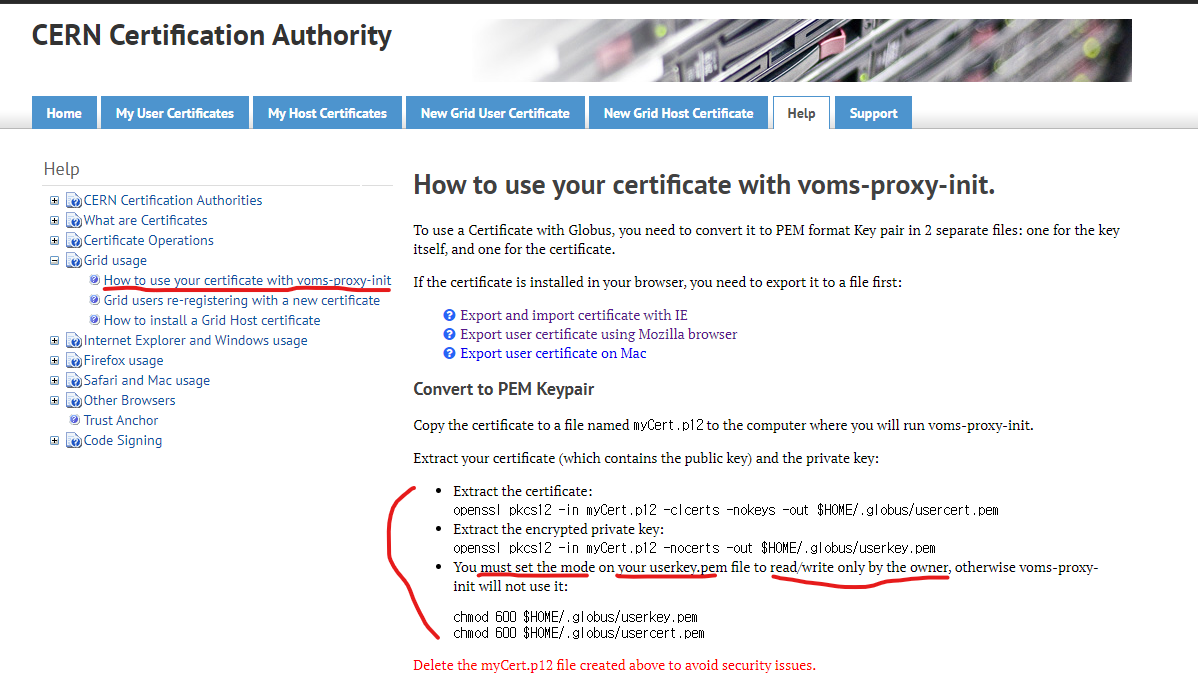
https://ca.cern.ch/ca/Help/?kbid=024010
CERN Certification Authority
How to use your certificate with voms-proxy-init. To use a Certificate with Globus, you need to convert it to PEM format Key pair in 2 separate files: one for the key itself, and one for the certificate. If the certificate is installed in your browser, you
ca.cern.ch
9. 한편 기존의 CA가 만료될 것 같아서 새로 CA를 발급받더라도 user 이름이 변하지 않으면 voms를 새로 등록할 필요는 없다.
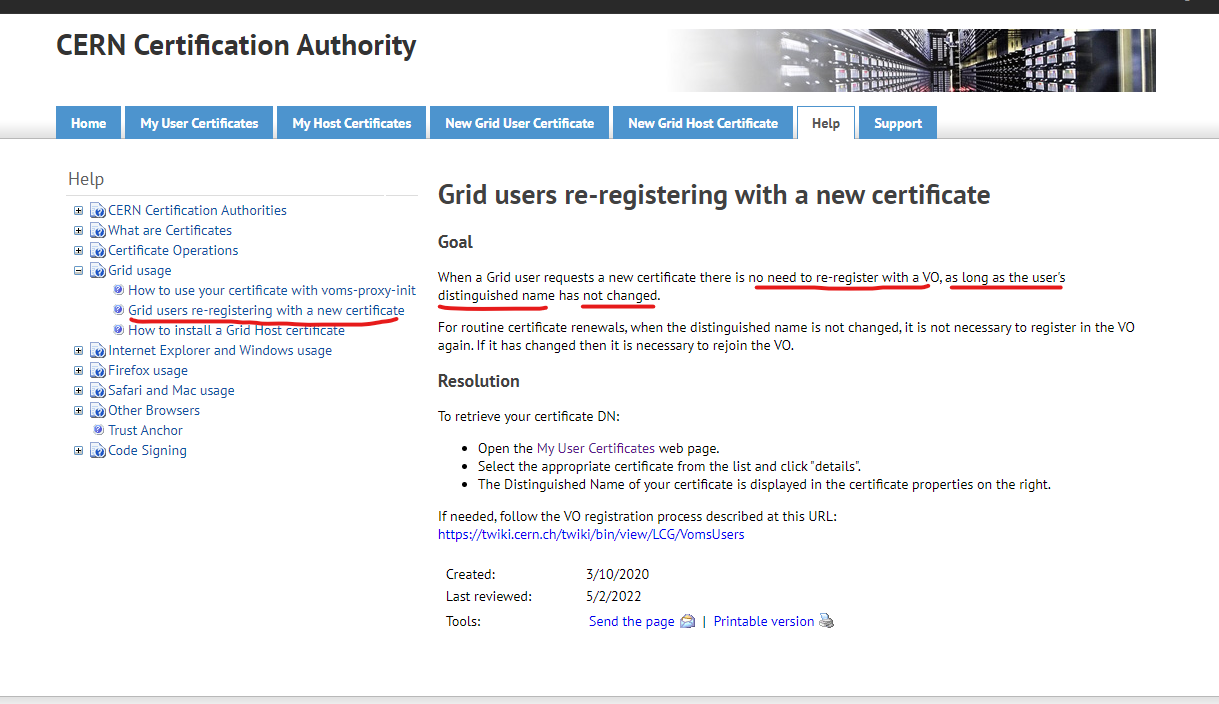
https://ca.cern.ch/ca/Help/?kbid=024020
CERN Certification Authority
Grid users re-registering with a new certificate Goal When a Grid user requests a new certificate there is no need to re-register with a VO, as long as the user's distinguished name has not changed. For routine certificate renewals, when the distinguished
ca.cern.ch
10. 만약 voms를 새로 추가하려고 시도하면 아래와 같이 된다.
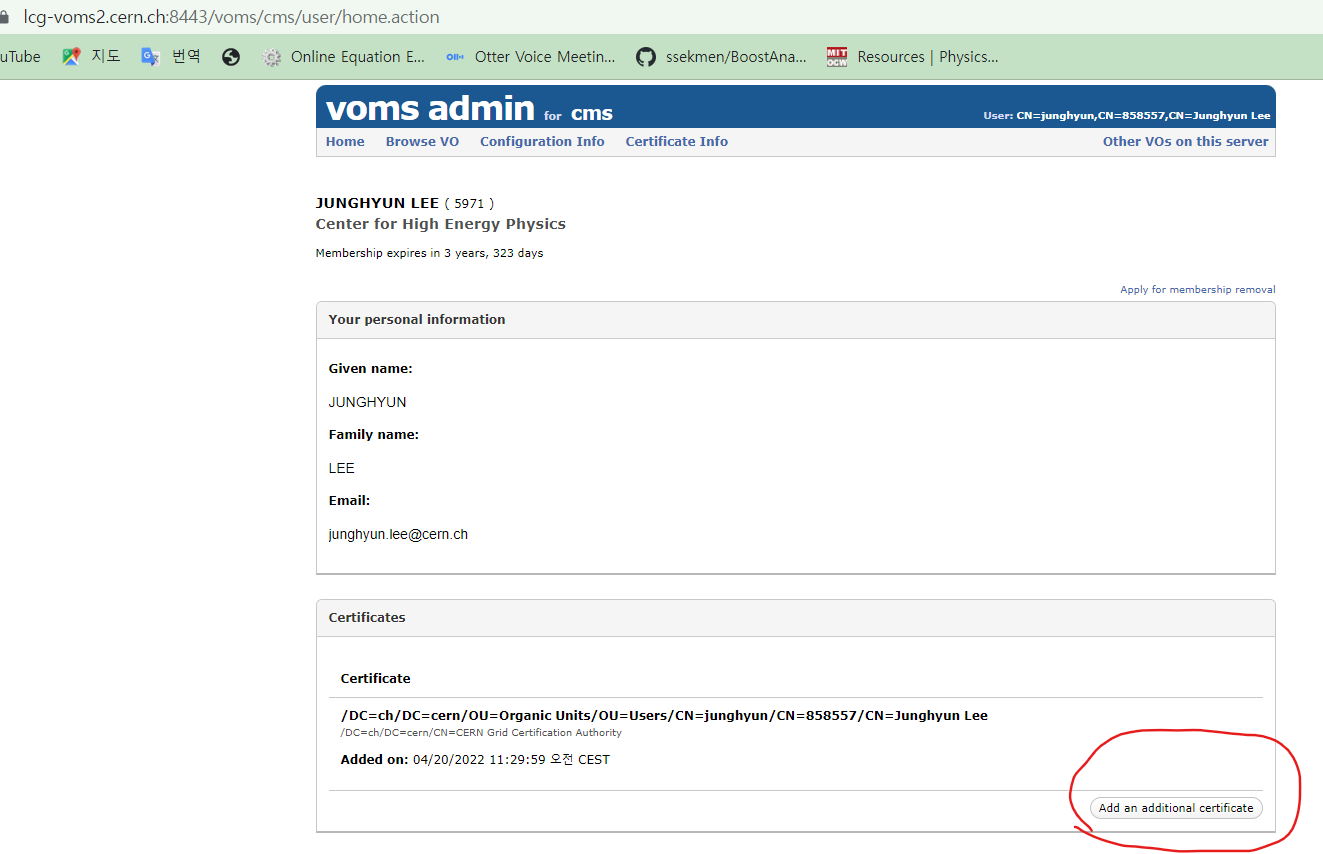

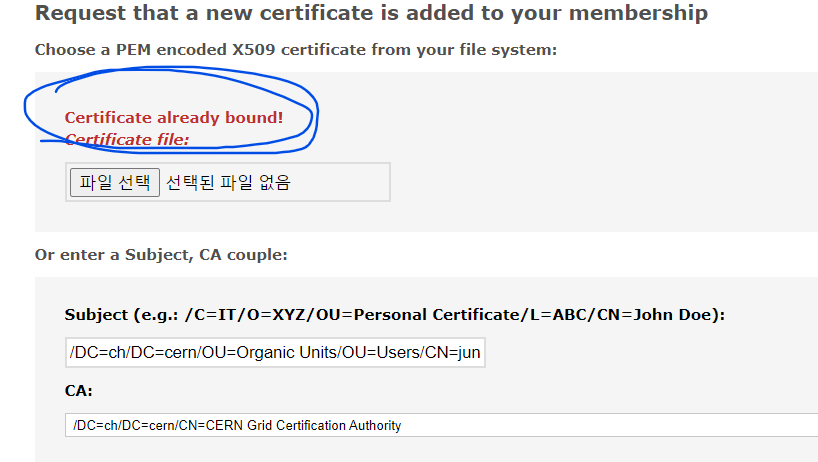
즉 이미 CA가 바운드 되었다고 나온다. 굳이 새로 할 필요가 없다.
다만 중요한 것은 새로운 CA를 추가하는 행위 자체는 괜찮지만 멤버십을 아예 새로 만드는 것은 안된다고 공식 문서에 나와있다. 아래 문서 내용을 참조하라.
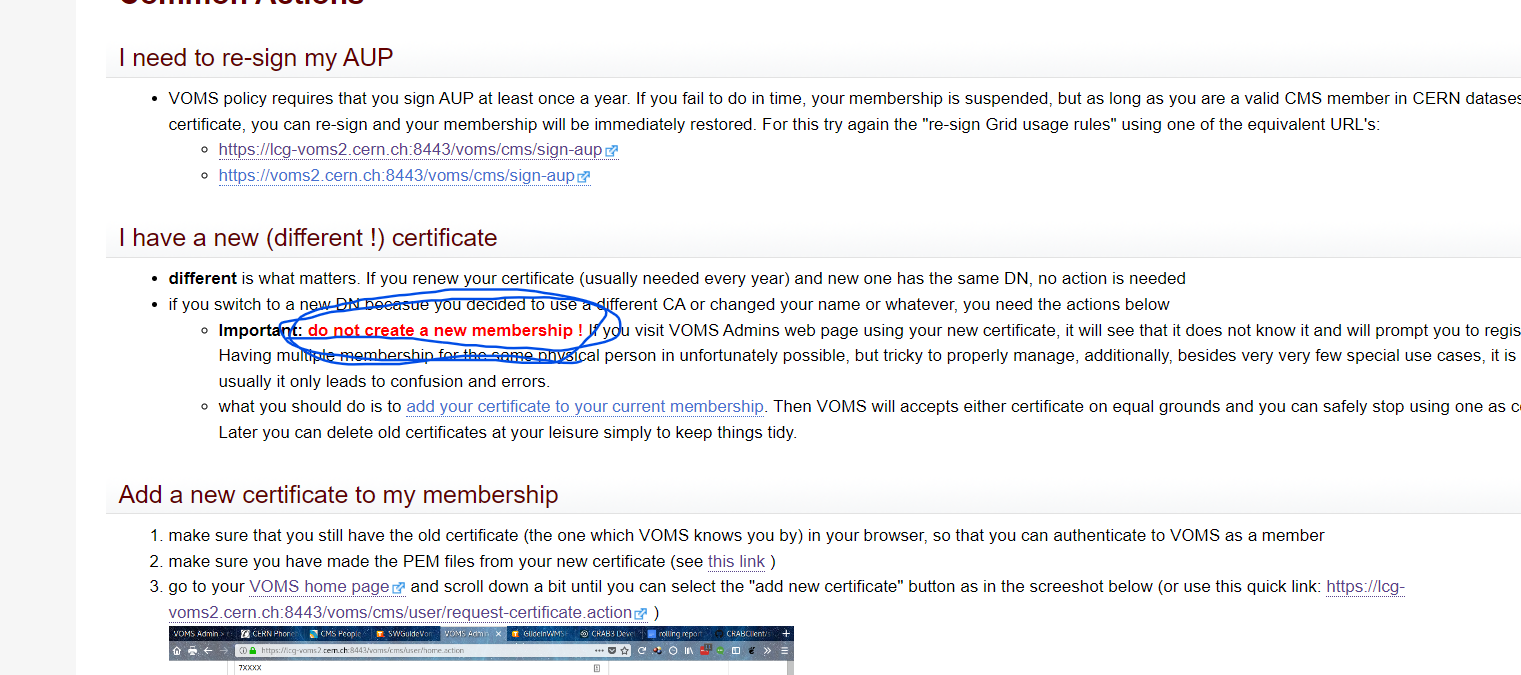
https://twiki.cern.ch/twiki/bin/view/CMSPublic/SWGuideVomsFAQ#Browser_issues
SWGuideVomsFAQ < CMSPublic < TWiki
VOMS FAQs Purpose of this page is to help when you need to contact VOMS Admin server but have problems. If you look for a general introduction to how to get a certificate, a VOMS membership, use those with CMSWEB and/or CRAB etc., please look in the CMS Of
twiki.cern.ch
'CMS Experiment > CMS Computing method' 카테고리의 다른 글
| Madgraph5 설치 (6) | 2024.03.01 |
|---|---|
| Madgraph5 Installation (0) | 2024.03.01 |