1. Madgraph 설치
- 홈페이지 URL
https://launchpad.net/mg5amcnlo
- 다운로드 방법 01 (시스템 상에 직접 다운로드)
먼저 MadGraph5 홈페이지에 들어가서 우측 하단의 Downloads 상자 안의 링크를 클릭하여 다운로드 한다.
- 다운로드 방법 02 ( [ wget ]을 이용한 다운로드)
혹은 리눅스 시스템 등에서 [ wget ]을 이용하여 다운로드 하고 싶다면 아래 그림처럼 다운로드 링크 위에 마우스 포인터를 이동시킨 후 우측 버튼을 눌러 나오는 우클릭 메뉴(or 컨텍스트 메뉴)에서 링크 주소 복사를 클릭한다. 그러면 클립보드에 링크 주소가 복사되며 이것을 터미널 상에서 붙여넣기 하여 다운로드 하면 된다. 현 버전의 경우 아래와 같이 [ wget ] 명령어가 구성된다.
wget https://launchpad.net/mg5amcnlo/3.0/3.5.x/+download/MG5_aMC_v3.5.3.tar.gz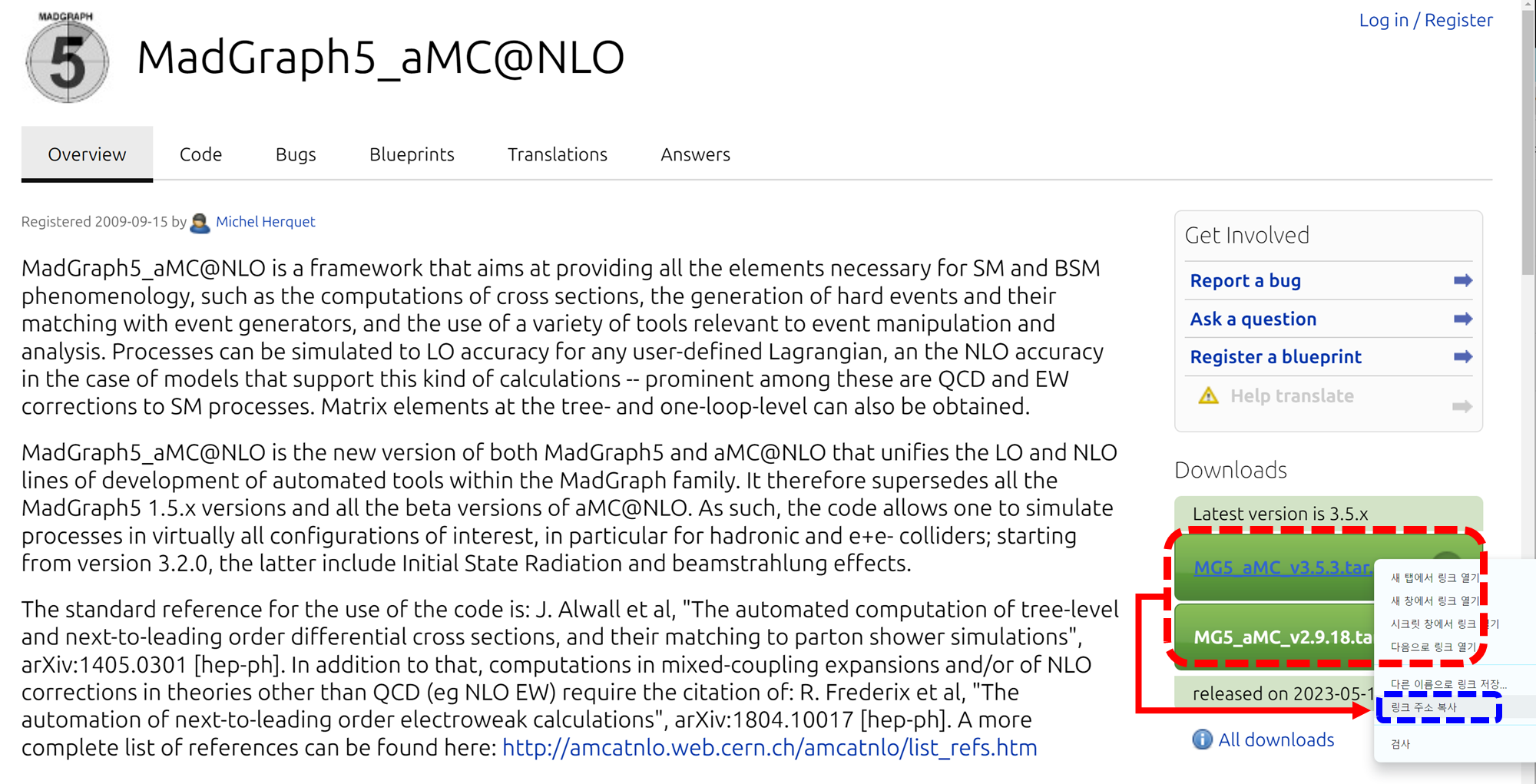
- 다운로드된 Madgraph 압축 파일을 압축 해제 시켜주기
[ .tar ] 파일로 압축된 Madgraph를 [ tar ] 명령어와 [ -zxvf ] 옵션과 함께 압축 해제 시켜준다.
tar -zxvf MG5_aMC_v3.5.3.tar.gz
- Madgraph 실행
다운로드된 Madgraph의 실행 파일은 bin 디렉토리 아래에 있다. 아래와 같은 명령어로 실행 파일을 실행해 준다.
cd MG5_aMC_v3_5_3/bin
./mg5_aMC
2. 추가 패키지 설치
만약 위의 절차대로 Madgraph를 실행했을 때 아래와 같은 오류가 뜬다면 추가 패키지를 설치한 후 그들의 경로를 configuration 파일에 등록해 주어야 한다.
************************************************************
*                                                          *
*                     W E L C O M E to                     *
*              M A D G R A P H 5 _ a M C @ N L O           *
*                                                          *
*                                                          *
*                 *                       *                *
*                   *        * *        *                  *
*                     * * * * 5 * * * *                    *
*                   *        * *        *                  *
*                 *                       *                *
*                                                          *
*         VERSION 3.5.3                 2023-12-23         *
*                                                          *
*    The MadGraph5_aMC@NLO Development Team - Find us at   *
*              http://madgraph.phys.ucl.ac.be/             *
*                            and                           *
*            http://amcatnlo.web.cern.ch/amcatnlo/         *
*                                                          *
*               Type 'help' for in-line help.              *
*           Type 'tutorial' to learn how MG5 works         *
*    Type 'tutorial aMCatNLO' to learn how aMC@NLO works   *
*    Type 'tutorial MadLoop' to learn how MadLoop works    *
*                                                          *
************************************************************
load MG5 configuration from ../input/mg5_configuration.txt
fastjet-config does not seem to correspond to a valid fastjet-config executable (v3+). We will use fjcore instead.
 Please set the 'fastjet'variable to the full (absolute) /PATH/TO/fastjet-config (including fastjet-config).
 MG5_aMC> set fastjet /PATH/TO/fastjet-config

eMELA-config does not seem to correspond to a valid eMELA-config executable.
 Please set the 'fastjet'variable to the full (absolute) /PATH/TO/eMELA-config (including eMELA-config).
 MG5_aMC> set eMELA /PATH/TO/eMELA-config

lhapdf-config does not seem to correspond to a valid lhapdf-config executable.
Please set the 'lhapdf' variable to the (absolute) /PATH/TO/lhapdf-config (including lhapdf-config).
Note that you can still compile and run aMC@NLO with the built-in PDFs
 MG5_aMC> set lhapdf /PATH/TO/lhapdf-config

None does not seem to correspond to a valid lhapdf-config executable.
Please set the 'lhapdf' variable to the (absolute) /PATH/TO/lhapdf-config (including lhapdf-config).
Note that you can still compile and run aMC@NLO with the built-in PDFs
 MG5_aMC> set lhapdf /PATH/TO/lhapdf-config

Using default text editor "vi". Set another one in ./input/mg5_configuration.txt
No valid eps viewer found. Please set in ./input/mg5_configuration.txt
No valid web browser found. Please set in ./input/mg5_configuration.txt
Checking if MG5 is up-to-date... (takes up to 2s)
failed to connect server
Loading default model: sm
INFO: load particles
INFO: load vertices
INFO: Restrict model sm with file ../models/sm/restrict_default.dat .
INFO: Run "set stdout_level DEBUG" before import for more information.
INFO: Change particles name to pass to MG5 convention
Defined multiparticle p = g u c d s u~ c~ d~ s~
Defined multiparticle j = g u c d s u~ c~ d~ s~
Defined multiparticle l+ = e+ mu+
Defined multiparticle l- = e- mu-
Defined multiparticle vl = ve vm vt
Defined multiparticle vl~ = ve~ vm~ vt~
Defined multiparticle all = g u c d s u~ c~ d~ s~ a ve vm vt e- mu- ve~ vm~ vt~ e+ mu+ t b t~ b~ z w+ h w- ta- ta+
Madgraph를 실행한 상태에서 아래와 같이 명령어를 쳐 주면 install이 진행된다. 컴파일에 몇 십분 정도의 시간이 소요된다. 각 라인은 [ fastjet ], [ lhapdf6 ], [ pythia8 ]을 설치하게 된다.
MG5_aMC>install fastjet
MG5_aMC>install lhapdf6
MG5_aMC>install pythia8
그러나 현 버전에선 [ lhapdf6 ]와 [ fastjet ]의 경로를 Madgraph가 제대로 찾지 못할 수도 있다. 따라서 Madgraph를 실행한 상태에서 아래 명령어를 통해 madgraph configuration 파일에 [ lhapdf6 ]와 [ fastjet ]의 경로를 알려주면 된다.
MG5_aMC>set <Path-to-madgraph>/MG5_aMC_v3_5_3/HEPTools/lhapdf6_py3/bin/lhapdf-config
MG5_aMC>set <Path-to-madgraph>/MG5_aMC_v3_5_3/HEPTools/fastjet/bin/fastjet-config
혹은 Madgraph 설치 폴더에 있는 [ input ] 디렉토리 아래의 [ mg5_configuration.txt ] 파일에 위 경로를 아래와 같은 방식으로 추가해 줘도 된다.
lhapdf = <path-to-madgraph>/MG5_aMC_v3_5_3/HEPTools/lhapdf6_py3/bin/lhapdf-config
fastjet = <path-to-madgraph>/jhlee/MG5_aMC_v3_5_3/HEPTools/fastjet/bin/fastjet-config
- 직접 패키지 설치 후 경로를 Madgraph configuration에 추가하여 사용하기
install 명령어를 사용하지 않고 각 패키지를 직접 설치한 후 필수 파일의 경로를 [ input/mg5_configuration.txt ] 에 직접 설정해 줄 수도 있다. 예를 들어 [ fastjet ]을 설치한 후 [ bin ] 디렉토리 내의 [ fastjet-config ] 경로가 아래와 같다고 하자.
/User/software/fastjet-3.4.2/installation/bin/fastjet-config
이와 같은 경우 [ mg5_configuration.txt ]에 [ fastjet ]을 아래와 같이 추가하면 된다.
fastjet = /User/software/fastjet-3.4.2/installation/bin/fastjet-config
'CMS Experiment > CMS Computing method' 카테고리의 다른 글
| Madgraph5 Installation (0) | 2024.03.01 |
|---|---|
| CERN Certification (grid, crab, voms, CA certification etc) (0) | 2023.03.29 |